The Phomemo M110 Label Printer review is for anyone weighing a compact label maker for product, address, barcode, or home-organization labels.
Its three included label sizes and app-based editing make it flexible for small tasks, while the phone-first Bluetooth setup and narrow print width shape where it fits best.
Phomemo M110 Review Summary
The quick verdict
1,000+ ratings
Read Amazon ReviewsPhomemo M110 Label Printer
A compact thermal label printer for small businesses and home users who need flexible label sizes, barcode support, and app-based design.
- Direct thermal printing, so ink, toner, and ribbons are not needed for printing.
- Prints labels from 20 to 50 mm wide and up to 80 mm long.
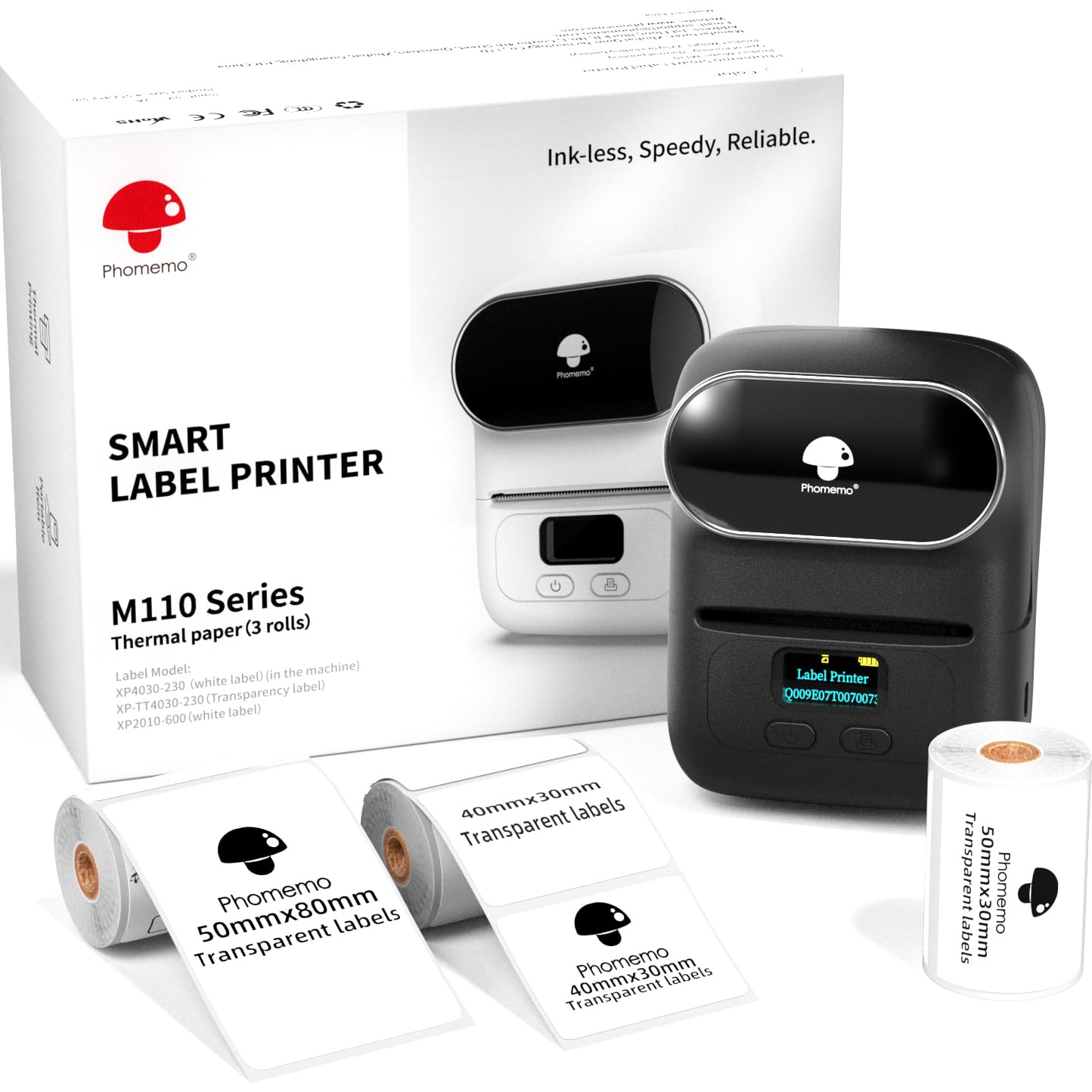
- The set includes the printer and three label sizes: 40 × 30 mm, 50 × 30 mm, and 50 × 80 mm.
- Print Master app supports label templates, saved custom templates, text, pictures, QR codes, and barcodes.

Pros
- Three included label sizes give buyers a useful range for trying different compact-label formats.
- Barcode, QR-code, image, and text printing support makes it adaptable to product and address labeling.
Consider before buying
- The 50 mm maximum width and 80 mm maximum length make it a poor match for larger labels.
- Bluetooth connection depends on opening Print Master and connecting inside the app, which adds a step to setup.
Read the full review summary
The M110 combines a portable thermal printer with a mobile design app, so you can create text, images, QR codes, and barcodes without relying on ink or toner.
Its supported label width runs from 20 to 50 mm, with lengths up to 80 mm, and the bundle includes three sizes: 40 × 30 mm, 50 × 30 mm, and 50 × 80 mm.
That range suits sellers making product or price labels, as well as households organizing smaller items. Batch printing, saved templates, OCR, and a claimed four hours of continuous operation add convenience for repeat work.
The tradeoff is that the M110 is designed for compact labels, and starting a print job requires connecting through the Print Master app rather than the phone’s Bluetooth settings.
The buying factors
Phomemo M110 Scorecard
Editorial scores reflect listed features and buyer fit; they are not laboratory measurements or customer ratings.
Label-size flexibility
The 20–50 mm width range and three included sizes accommodate several common compact-label tasks.
Small-business usefulness
Barcode, QR-code, product-label, and batch-printing support address practical retail and product workflows.
Mobile workflow
Bluetooth and app-based editing are convenient, though the app is part of the required connection process.
Design options
More than 30 fonts, 500-plus emojis, 40-plus borders, and ready-made templates allow varied designs.
Repeat-printing support
Batch printing and a stated speed of 1.2 inches per second are useful for recurring label runs.
Portability
The mini format and claimed four hours of continuous operation suit mobile or occasional work away from a desk.
Large-format capability
The maximum 50 mm width and 80 mm length suit smaller labels, limiting fit for larger label layouts.
Key Features and Specifications of Phomemo M110
- Direct thermal printing, so ink, toner, and ribbons are not needed for printing.
- Prints labels from 20 to 50 mm wide and up to 80 mm long.
- The set includes the printer and three label sizes: 40 × 30 mm, 50 × 30 mm, and 50 × 80 mm.
- Print Master app supports label templates, saved custom templates, text, pictures, QR codes, and barcodes.
- The app offers more than 30 fonts, 500-plus emojis, and 40-plus borders.
- Supports batch printing and has a stated speed of 1.2 inches per second.
- OCR can recognize text from an image and convert it to editable text; continuous operation is stated at up to four hours.
Pros and Cons of Phomemo M110
Pros
- Three included label sizes give buyers a useful range for trying different compact-label formats.
- Barcode, QR-code, image, and text printing support makes it adaptable to product and address labeling.
- Batch printing and reusable templates can simplify repeated label jobs.
- Thermal printing avoids ink, toner, and ribbon purchases.
Consider before buying
- The 50 mm maximum width and 80 mm maximum length make it a poor match for larger labels.
- Bluetooth connection depends on opening Print Master and connecting inside the app, which adds a step to setup.
- The three included sizes may not match every workflow; check the dimensions of your intended label before buying.
Who Should Buy Phomemo M110?
Good fit
Consider the M110 if you run a small shop, sell at markets, or manage products that need compact price, ingredient, clothing, or barcode labels.
The supported widths and lengths cover several small-label formats, and batch printing can help when you need a set of similar labels rather than one at a time.
It also makes sense for home or office use when you want to label containers, folders, or small items and prefer to design from a phone.
The supplied mix of three label sizes is useful if your needs are still taking shape.
Before choosing it, compare the printer’s maximum 50 × 80 mm output with your actual label dimensions and make sure you are comfortable using the Print Master app for Bluetooth setup.
Who should skip it
Skip this model if your routine depends on labels wider than 50 mm or longer than 80 mm; those dimensions exceed its stated print area.
Look elsewhere if you want to start a print job through your device’s Bluetooth settings or would rather not use an app-based workflow. The M110 requires connecting from within Print Master.
How the Phomemo M110 Fits Compact Labeling
Three sizes for varied small labels
The included 40 × 30 mm, 50 × 30 mm, and 50 × 80 mm rolls provide a starting set for comparing different label layouts.
They can suit small product identifiers, prices, or address details, though buyers should confirm that the available dimensions leave enough room for the information they need to print.
A mobile design and print workflow
The phone app combines templates and saved designs with text, pictures, QR codes, and barcodes. That makes the M110 more flexible than a text-only label tool for users who switch among label types.
The connection sequence matters: Bluetooth must be on, and pairing is completed in Print Master rather than in the device’s Bluetooth settings.
Batch work and stated runtime
A stated print speed of 1.2 inches per second, batch printing, and up to four hours of continuous operation point toward short production runs and recurring labeling sessions.
Those figures help frame the intended workflow, but the best fit still depends on how many labels you need and how often you print.
Compact output with clear boundaries
The M110 handles labels up to 50 mm wide and 80 mm long, covering many small business and household uses described for the printer.
That envelope is the main buying constraint: check both dimensions of your labels and the amount of text, code, or image you plan to fit before committing to a format.
Alternatives to Phomemo M110
Desktop Label Printers alternative

6,000+ ratings
Read Amazon ReviewsPhomemo M110 Label Maker
Choose between these M110 bundles by checking the specific package and connection details that matter to you.
Both target compact label jobs and include three label sizes; the variant’s stated Bluetooth range may be useful if that is a deciding factor.
- This M110 variant also includes three label sizes and supports 20–50 mm widths.
- Its description specifies iOS and Android compatibility and a Bluetooth range of up to 33 feet.
- The reviewed M110 bundle includes three label sizes, app-based templates, batch printing, and a 20–50 mm width range.
Desktop Label Printers alternative

700+ ratings
Read Amazon ReviewsPhomemo M220 Label Maker
Consider the M220 if you want a wider label format or computer connectivity alongside phone printing. The M110 remains the more directly suited option if its smaller label sizes and included three-roll selection match your routine.
- The M220 supports label widths from 0.78 to 3.14 inches, connects to phones and tablets by Bluetooth, and to computers by USB.
- Its description says it does not support 4 × 6 shipping labels.
- The M110 prints labels up to 50 mm wide and 80 mm long and is positioned for compact product, address, and household labels.
Is Phomemo M110 Worth It?
The Phomemo M110 Label Printer is worth considering for small businesses and home users who need compact, app-designed labels with barcode, QR-code, and batch-printing support.
Its three included sizes make it easier to explore different formats, while thermal printing keeps ink and toner out of the supply list.
Buy it if your labels fit within 50 × 80 mm and the Print Master connection flow suits you. Choose another format if your work needs larger labels or a different printing workflow.
Your review at a glance
1,000+ ratings
Read Amazon ReviewsPhomemo M110 Label Printer
A compact thermal label printer for small businesses and home users who need flexible label sizes, barcode support, and app-based design.
- Direct thermal printing, so ink, toner, and ribbons are not needed for printing.
- Prints labels from 20 to 50 mm wide and up to 80 mm long.
- The set includes the printer and three label sizes: 40 × 30 mm, 50 × 30 mm, and 50 × 80 mm.
- Print Master app supports label templates, saved custom templates, text, pictures, QR codes, and barcodes.